DNS over HTTPS
DNS lookups sent inside encrypted HTTPS, so others on the network cannot read them.
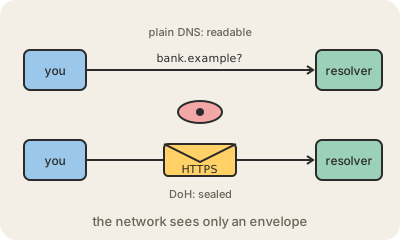
Every time you open a site, your device first asks a DNS resolver which IP address belongs to that name. For decades those questions traveled in plain text. Anyone on the path, the café Wi-Fi, your internet provider, an attacker on the same network, could read the list of sites you visit and even forge the answers.
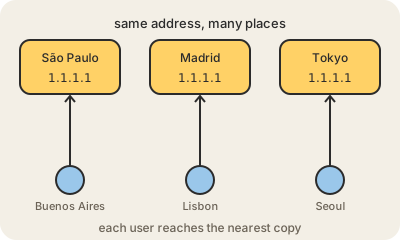
DNS over HTTPS, or DoH, wraps those questions inside HTTPS, the same encryption that protects web pages. To an observer, a DoH lookup looks like any other HTTPS traffic to the resolver. The IETF standardized it in 2018 as RFC 8484, and major browsers and operating systems can use it with public resolvers like Cloudflare's 1.1.1.1, Google's 8.8.8.8 or Quad9. A close cousin, DNS over TLS (DoT), also encrypts DNS but on its own dedicated port, which makes it easier for a network to spot and block.
It is not a privacy cure-all. The resolver you send your questions to still sees every one of them, so you are moving your trust, not removing it. Your provider still sees which IP addresses you connect to, and the site's name can still leak in other parts of the connection. It also has a side effect that companies and schools dislike: filters that work by blocking DNS on the local network stop working when devices skip them, which is why many managed networks turn it off.
Keep in mind
- DoH encrypts DNS lookups by sending them over HTTPS.
- It was standardized in 2018 as RFC 8484 and is built into major browsers.
- The resolver still sees your queries; you choose whom to trust.
- It bypasses DNS filters on the local network, which some networks block.
Go deeper
- RFC 8484: DNS Queries over HTTPS
- DNS over HTTPS in Firefox (Mozilla Support)
- DNS over HTTPS (Cloudflare docs)