HTTPS
The padlock in your browser: web traffic nobody in between can read.
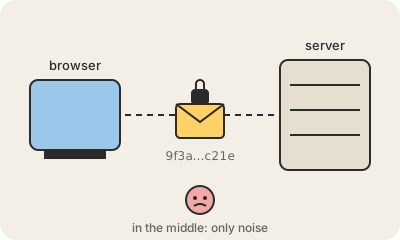
HTTPS is plain HTTP (the language browsers and websites speak) wrapped in encryption, using a protocol called TLS. When you open a site with the padlock, your browser and the server first agree on a secret key that only they know, then every request and response is scrambled with it.
Anyone sitting in the middle (the café Wi-Fi, your internet provider, a hacker on the same network) sees that you are talking to a site, but not what you send: no passwords, no card numbers, no page content.
HTTPS also proves identity. The server shows a certificate signed by an authority your browser trusts, so you know you are talking to your bank and not to a copy of it. Since Let's Encrypt made certificates free in 2015, almost the whole web moved to HTTPS.
Keep in mind
- HTTPS = HTTP + TLS encryption. The padlock means the connection is encrypted.
- It hides what you send, not which site you visit.
- Certificates prove the site is who it says it is.