Web browser
The app that fetches web pages from the internet and draws them on your screen.
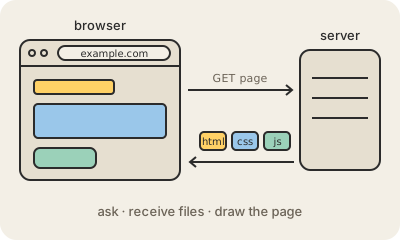
A web browser is the app you use to visit websites: Chrome, Safari, Firefox and Edge are browsers. When you type an address or click a link, the browser looks up which server holds that site (using DNS), asks it for the page over HTTP or HTTPS, and receives a bundle of files back: HTML for the content, CSS for the looks, JavaScript for the behavior, plus images and fonts.
Then comes the hard part. The browser's rendering engine turns those files into the page you see, working out the position of every word and box, and runs the JavaScript that makes the page interactive. A modern site can involve hundreds of files, and the browser fetches and assembles them in a fraction of a second.
Browsers are also a security wall. Each site runs in its own sandbox, so a page cannot read your files or peek at what another tab is doing. The browser shows the padlock for HTTPS, stores passwords and cookies, warns about known phishing sites and asks before a page uses your camera or location. Under the hood only a few engines exist, so many browsers with different names share the same core.
Keep in mind
- Fetches pages from servers using DNS and HTTP(S), then draws them.
- Its rendering engine turns HTML and CSS into pixels and runs JavaScript.
- Each site is isolated, so pages cannot read your files or other tabs.
- Many browsers share the same few engines underneath.