Sandboxing
Running a program in a closed box so it cannot harm anything outside it.
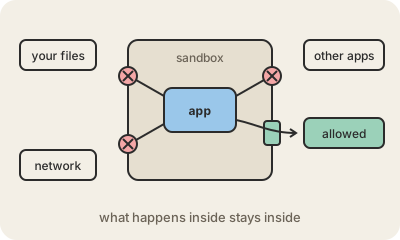
Sandboxing means running a piece of software inside a restricted space, the sandbox, where it can only touch what it has been explicitly given. It cannot read your other files, talk to other programs or change the system unless a narrow, controlled door allows it. If the program is buggy or malicious, the damage stays inside the box.
You use sandboxes all day without noticing. Your web browser runs each website in its own sandboxed process, so a malicious page that exploits a bug still cannot read your documents. Phone apps live in sandboxes too, which is why an app has to ask for permission before it sees your photos, contacts or location. Containers and virtual machines are sandboxes at a bigger scale, isolating whole applications on a shared server.
Security teams also use sandboxes on purpose: suspicious email attachments are opened in a disposable environment to watch what they do before anyone opens them for real. And it matters more now with AI: when an assistant writes and runs code, it is usually run in a sandbox so a mistake cannot delete or leak anything important. Sandboxes are not perfect, though. Attackers look for "sandbox escapes", bugs that break through the walls, so the walls also need updates.
Keep in mind
- A sandbox limits what a program can see and touch to what it was explicitly given.
- Browsers, phone apps, containers and virtual machines all rely on it.
- Used to safely examine suspicious files and to run AI-generated code.
- Bugs that break out of a sandbox are serious, so it still needs updates.