API key
A secret string that identifies your app when it calls someone else's API.
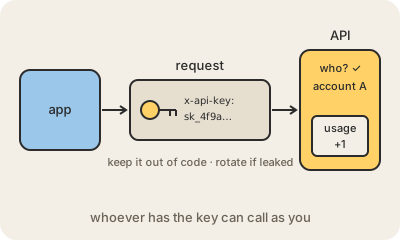
An API key is a long, random-looking string, something like sk_live_4f9a…, that a service gives you so your program can use its API. Every request your code sends includes the key, usually in a header, and the service uses it to know who is calling: which account to bill, which limits apply and what that caller is allowed to do.
Because whoever has the key can act as you, it works like a password. If one leaks, a stranger can run up your bill on a paid AI or maps API, read your data or send messages in your name. The most common leak is a key written directly in the code and pushed to a public GitHub repository; automated bots scan for exactly that within minutes.
Good habits follow from that. Keep keys out of the code, in environment variables or a secrets manager such as AWS Secrets Manager. Never put a secret key in a website's or mobile app's code, since anyone can read it there; call the API from your server instead. Give each key only the permissions it needs, use separate keys for testing and production, and rotate them: create a new one, switch over, and revoke the old. Keys identify a program; for acting on behalf of a person, services use OAuth tokens instead.
Keep in mind
- Identifies the calling app and its account, often for billing and limits.
- Treat it like a password: anyone holding it can use it.
- Store it in environment variables or a secrets manager, never in code.
- If it leaks, revoke it and create a new one right away.
Go deeper
- What is an API key? (AWS)
- Manage API keys (Google Cloud docs)
- Secrets Management Cheat Sheet (OWASP)