OAuth and SSO
Log in once with an account you trust, and let it vouch for you in other apps.
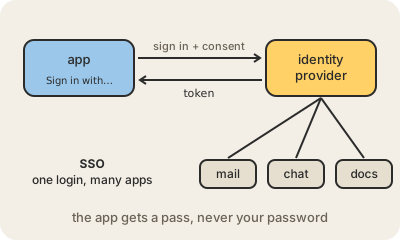
When an app offers Sign in with Google, it is using OAuth: a standard that lets one service act on your behalf in another without ever seeing your password. The app sends you to Google, you sign in there, and Google asks whether you agree to share, say, your name and email. If you say yes, Google hands the app a token: a temporary pass that works only for what you approved and can be revoked at any time.
Those permissions are called scopes, and they are what the consent screen lists: 'read your calendar', 'see your email address'. Strictly, OAuth is about permission to access things; the part that tells the app who you are is OpenID Connect, a layer built on top of it. In practice both travel together, and people say OAuth for the whole flow.
SSO (single sign-on) applies the same idea inside a company. Employees log in once to an identity provider, such as Okta, Microsoft Entra ID or Google Workspace, and from there get into the mail, the chat, the CRM and dozens of other tools without a separate password for each. Security improves because there is one place to enforce two-factor authentication, and when someone leaves the company, disabling one account closes every door at once.
Keep in mind
- With OAuth the app gets a limited, revocable token, never your password.
- Scopes say exactly what the app may do; the consent screen lists them.
- OpenID Connect adds identity (who you are) on top of OAuth.
- SSO gives one login for many apps, and one switch to turn access off.