Object storage
Files stored as whole named objects, reached over the web, almost without limit.
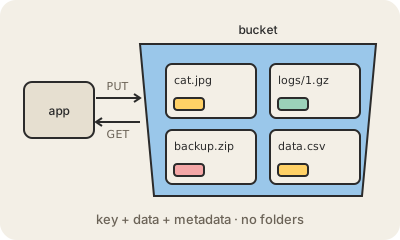
Object storage keeps data as objects: a whole file (a photo, a video, a backup, a CSV export) plus some metadata about it, saved under a unique name called a key, inside a container usually called a bucket. There are no real folders and no disks to manage; you save an object with a PUT request over HTTP and get it back with a GET. Amazon S3 made this model popular, and Google Cloud Storage, Azure Blob Storage and many others follow it.
It is different from the two older kinds of storage. Block storage, like a laptop's disk or an EBS volume, is split into small blocks a computer formats and edits in place, which is fast for databases. File storage is the shared drive with folders that many machines can open at once. Object storage gives up editing in place (you replace the whole object) and in return scales to billions of objects, spreads copies across several data centers for durability and is cheap per gigabyte.
That combination makes it the default home for things that are written once and read many times: website images and videos, app uploads, backups, logs and the files of a data lake. Most providers offer storage classes, from fast to archive, where colder data costs less to keep but more, or longer, to get back.
Keep in mind
- Data is stored as whole objects with a key and metadata, inside buckets.
- Read and written over HTTP with simple requests like PUT and GET.
- Objects are replaced, not edited in place, unlike block or file storage.
- Cheap, durable and nearly unlimited: the home of backups, media and data lakes.