CSV
A plain text file that holds a table: one row per line, commas between values.
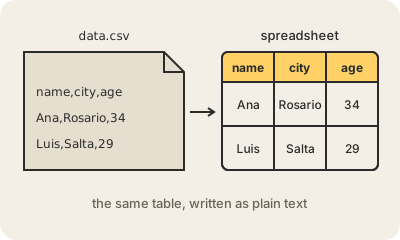
A CSV file (comma-separated values) is the simplest way to write a table down. Each line is a row, and inside a line the values are separated by commas; the first line usually holds the column names. Because it is plain text, any program can read it: a spreadsheet, a database, a script, even a text editor.
A small one looks like this: name,city,age on the first line, then Ana,Rosario,34 and Luis,Salta,29. When a value contains a comma itself, it goes between double quotes ("Buenos Aires, AR"). There is no single official version, so details vary: many spreadsheets set up for Spanish use semicolons, because there the comma is the decimal separator, and accents come out garbled when the file was not saved as UTF-8.
CSV is the universal export button: banks, CRMs, open-data portals and analytics tools all offer it, and it is often the first step when moving data from one system to another. Its weakness is that it has no types: the file does not say whether 03/04 is a date, a fraction or text, so every program has to guess. For large analytics datasets, formats like Parquet are much smaller and faster to read.
Keep in mind
- One row per line, values separated by commas, column names on the first line.
- Plain text: every spreadsheet, database and programming language can open it.
- It has no types, so dates and numbers are open to interpretation.
- Separators and encodings vary; if accents look broken, check that it is UTF-8.