Cookies
Small notes a website asks your browser to keep, so it can recognize you later.
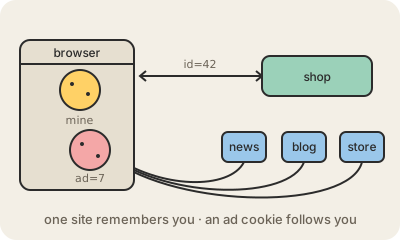
A cookie is a small piece of text that a website asks your web browser to store, like session=8f3a…. Every time you go back to that site, the browser sends the cookie along with each request. That is how a site remembers that you are logged in, what is in your cart or which language you picked, even though each page load is otherwise a separate conversation.
Cookies belong to the site that set them. A first-party cookie comes from the site you are visiting. A third-party cookie comes from another company whose content is embedded in the page, like an ad network or a social media button. If the same ad network sits on thousands of sites, its cookie lets it recognize you on all of them and build a profile of your browsing. That is what people usually mean by tracking cookies.
Because of this, privacy laws such as the EU's GDPR and ePrivacy rules require sites to ask before setting non-essential cookies, which is where the cookie banners come from. Browsers have also tightened the rules: Safari and Firefox block third-party cookies by default, and deleting your cookies logs you out of sites and makes them forget you.
Keep in mind
- Small text the browser stores and sends back to the same site.
- They keep you logged in and remember carts and preferences.
- Third-party cookies can follow you across many sites; that is tracking.
- Clearing them logs you out and resets what sites remember about you.