Phishing
A fake message that tricks you into handing over a password or a payment.
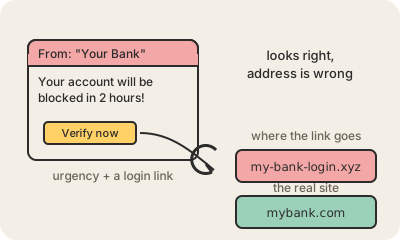
Phishing is a message (email, SMS, WhatsApp, a phone call) that pretends to come from someone you trust, such as your bank, a courier, the tax office or your boss, and pushes you to act fast: click a link, log in, pay a small fee, open an attachment. The link goes to a copy of the real site that captures what you type. The attachment installs Malware. Nothing is hacked; you are convinced to open the door yourself.
The classic example: 'Your package is on hold, pay $2.50 in customs fees' with a link to correo-envios-ar.com, a page that looks exactly like the courier. Targeted versions (spear phishing) use your name, your company and a believable story, like an invoice from a real supplier with a changed bank account. Most large breaches in the news started with one of these.
The tells are consistent: urgency, a request for credentials or money, and an address that is almost right. A real company rarely needs you to confirm your password through a link, and the sender name in an email is just text anyone can write; the domain after the @ is what counts.
Practical takeaway: do not click, go. Open the bank or courier by typing its address or from its app and check there. A Password manager helps because it refuses to fill your password on a look-alike domain, and two-factor authentication with a passkey cannot be phished at all. If you already clicked, change that password and tell the service; it happens to careful people too.
Keep in mind
- Phishing targets people, not software: it convinces you to hand over the keys.
- Urgency plus a request for a password or a payment is the pattern to recognize.
- Check the domain after the @ and in the link, not the display name.
- Do not click: open the site yourself, from your bookmarks or the app.