Password manager
An encrypted vault that remembers a different strong password for every site.
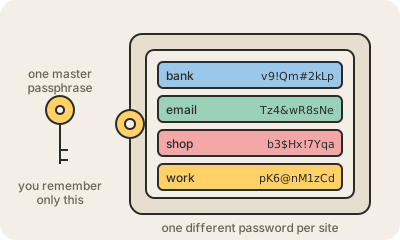
A password manager is an app that creates, stores and types your passwords for you. You remember one long master password; the app remembers the hundreds of others, each one different, random and long (v9!Qm#2kLp...), and fills them in when you log in. The vault is protected with encryption, so in a well-designed manager the company that runs it cannot read your passwords either.
The problem it solves is reuse. Sites get breached, and when one leaks its list of emails and passwords, attackers try those same pairs on every other service, automatically. If your email password is also your bank password, one leak opens both. With a manager, each site has its own key, so a leak stays contained to that site.
It also helps against phishing: the manager fills a password only on the exact site it was saved for. If a fake page imitates your bank on a look-alike address, the autofill does nothing, and that silence is a warning. Popular options are the built-in ones from Apple, Google and browsers, and dedicated apps like Bitwarden (open source) or 1Password.
Practical takeaway: start with the one already on your phone or browser. Make the master password a long passphrase of four or five random words, turn on two-factor authentication for the manager itself, and let it replace your reused passwords one site at a time.
Keep in mind
- Reused passwords are the real risk: one leak opens every account that shares it.
- You memorize one long master passphrase; everything else is generated and random.
- Autofill refuses to work on a look-alike site, which blocks a lot of phishing.
- The built-in managers from Apple, Google and browsers are a fine place to start.