Passkeys
A way to sign in without a password, using your phone's or computer's lock instead.
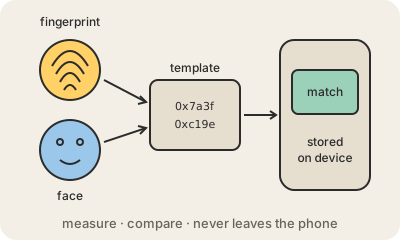
A passkey replaces the password for a site or app. Instead of typing something you memorized, you unlock your phone or computer the way you normally do, with your fingerprint, your face or your device PIN, and you are in. Google, Apple, Microsoft, banks, shops and many other services support them.
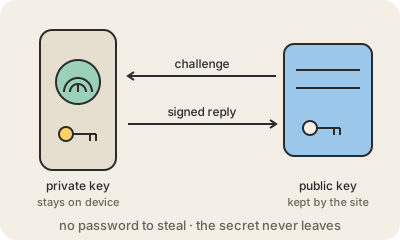
Underneath it uses public-key cryptography. When you create a passkey, your device makes a pair of keys: a private key that stays with you, and a public key that is sent to the site. To sign in, the site sends a random challenge, your device signs it with the private key after you unlock it, and the site checks the signature with the public key. Your fingerprint never leaves your device; it only unlocks the key.
The big win is that there is nothing worth stealing on the site's side and nothing you can be tricked into typing. If the site's database leaks, the public keys are useless to an attacker. And each passkey is tied to the real web address it was created for, so a look-alike phishing site simply cannot ask for it. That is why passkeys are considered phishing-resistant, which ordinary passwords and SMS codes are not.
Passkeys can live in the password manager of your phone or computer, such as Apple's or Google's, or in a third-party one, which syncs them across your devices; they can also be stored on a physical security key. If you lose your phone, you recover them from that account like any other synced data. The technology is an open standard, built on FIDO2 and WebAuthn, created by the FIDO Alliance and the W3C.
Keep in mind
- You sign in by unlocking your device; there is no password to remember or type.
- The site only stores a public key, useless to anyone who steals it.
- Each passkey works only on the real site, so phishing pages cannot capture it.
- Synced by your device's password manager, or kept on a physical security key.
Go deeper
- Sign in with a passkey instead of a password (Google)
- About the security of passkeys (Apple)
- Passkey on Wikipedia