SSH
An encrypted way to log in to another computer and type commands on it.
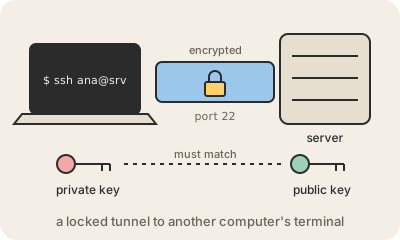
SSH (Secure Shell) lets you open the command line of a computer somewhere else, usually a server in a data center or in the cloud, and work on it as if you were sitting in front of it. You type ssh [email protected], and from then on every command runs over there. Everything that travels between the two machines, including what you type and what comes back, is encrypted.
It replaced older tools like Telnet that sent everything, passwords included, as plain text anyone on the path could read. SSH normally listens on port 22, and the same encrypted channel also carries file copies (scp and SFTP), connections to Git hosts like GitHub, and tunnels that forward one program's traffic through the server.
You can log in with a password, but the usual way is a key pair, an application of public-key cryptography. You create two matching keys on your laptop: the private key stays there, ideally protected with a passphrase, and the public key is copied to the server. When you connect, the server checks that you hold the private key without the key ever being sent. Losing a public key is harmless; leaking a private key is like losing the master key.
The server also proves who it is. The first time you connect, SSH shows the server's fingerprint and asks whether to trust it; afterwards, if that fingerprint ever changes, you get a loud warning, because someone could be impersonating the machine. Common hardening steps are turning off password logins, disallowing direct login as the administrator account, and removing keys of people who left.
Keep in mind
- Gives you a remote command line over an encrypted connection, usually on port 22.
- Key pairs beat passwords: the public key goes on the server, the private key never leaves you.
- A changed server fingerprint warning means stop and check.
- Also carries file transfers (SFTP,
scp) and Git connections.