Command line
Controlling a computer by typing text commands instead of clicking icons.
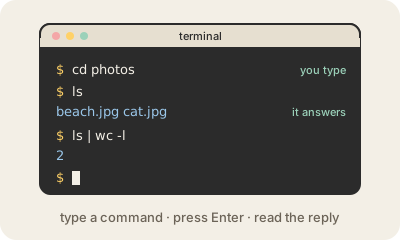
The command line is a way to use a computer by typing instructions and reading text replies, with no buttons or icons. You open a terminal app (Terminal on a Mac, Windows Terminal or PowerShell on Windows) and type something like ls to list the files in a folder, cd photos to move into a folder, or cp report.pdf backup/ to copy a file. The program that reads and runs what you type is called the shell; Bash and Zsh are common ones.
It looks old-fashioned, but it is still central to software work. Commands are exact and repeatable: you can save a sequence of them in a script and run it a thousand times, or chain small tools together so the output of one becomes the input of the next. Many developer tools, like Git or package managers, are used mainly or only from the command line, and most servers have no screen at all, so people manage them by typing commands over a remote connection.
The flip side is that it trusts you. There is usually no "Are you sure?" and no trash can: a mistyped delete command can erase files for good. That is why careful users read a command before pressing Enter, especially one copied from the internet.
Keep in mind
- You type commands in a terminal; a shell such as Bash or Zsh runs them.
- Exact and repeatable: easy to script and to automate.
- The standard way to manage servers and many developer tools.
- Powerful and unforgiving: deleted files usually do not go to a trash can.
Go deeper
- Command line crash course (MDN)
- The Linux command line for beginners (Ubuntu)
- Command-line interface on Wikipedia