SSD
Storage with no moving parts: where your files live when the power is off.
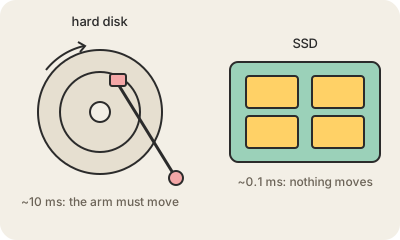
An SSD (Solid-State Drive) is the storage in almost every modern laptop, phone and server: the place where files, programs and the operating system stay saved when the power is off. It stores data in flash memory chips, the same technology as a USB stick, and it has no moving parts. The older alternative, the hard disk drive (HDD), spins magnetic platters and reads them with a moving arm.
The difference you feel is speed. An SSD finds any file in a fraction of a millisecond; a hard disk has to physically move its arm, which takes several milliseconds. That is why a computer with an SSD boots in seconds and opens apps instantly, and why replacing an old laptop's hard disk with an SSD was for years the single best upgrade. SSDs are also silent, lighter and survive drops.
Hard disks have not disappeared: per gigabyte they are still much cheaper, so data centers use them for backups and the bulk of cloud storage like Amazon S3, with SSDs in front for the hot, frequently accessed part. Flash cells also wear out after many writes, though modern drives manage this well enough that a normal user never notices.
SSD versus RAM, since people confuse them: RAM is the fast working memory that empties when you shut down; the SSD is the persistent storage that keeps your files. More RAM makes multitasking smoother; a bigger SSD lets you keep more files.
Keep in mind
- Persistent storage made of flash chips; no moving parts, very fast access.
- Replaced hard disks in laptops and phones; hard disks remain for cheap bulk storage.
- Connects through SATA (older, slower) or NVMe over PCIe (newer, much faster).
- Not the same as RAM: the SSD keeps data when powered off, RAM does not.