Display resolution
How many dots, or pixels, make up a screen's image: more dots, finer detail.
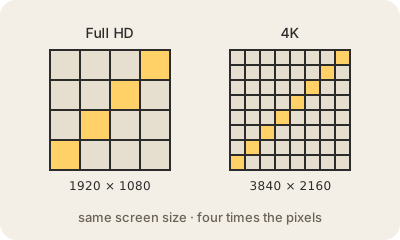
Every screen is a grid of tiny colored dots called pixels. The display resolution is how many there are, written as width by height. Full HD, also called 1080p, is 1920 × 1080 pixels, about two million dots. 4K (on TVs, strictly "4K UHD") is 3840 × 2160: twice as many across and twice as many down, so four times as many pixels in total.
More pixels can show finer detail, but only if they are small enough for your eyes to tell apart. What really matters is pixel density, measured in pixels per inch (PPI), together with how far away you sit. A phone held close to your face needs a very high density to look sharp; a big TV across the room looks fine at a much lower one. That is why a 4K phone and a 4K TV have the same number of pixels and feel completely different.
Resolution also has costs. Every extra pixel has to be computed, sent and stored: a 4K video needs much more bandwidth and storage than an HD one, and a game in 4K asks far more of the GPU. And picture quality depends on other things too, such as contrast, brightness, color accuracy and how many times per second the screen refreshes, so a bigger number on the box does not automatically mean a better image.
Keep in mind
- Resolution is the number of pixels, written as width × height.
- Full HD is 1920 × 1080; 4K is 3840 × 2160, four times as many pixels.
- Sharpness depends on pixel density and viewing distance, not on resolution alone.
- More pixels need more bandwidth, storage and graphics power.