FTP and SFTP
Two ways to move files to and from a server; only one of them keeps them private.
FTP (File Transfer Protocol) is one of the oldest services on the internet, older than the web itself. You connect to an FTP server with a username and password, see its folders, and upload or download files. For decades it was how people published websites to their web hosting, how printers dropped scans into shared folders and how companies swapped files with banks and suppliers.
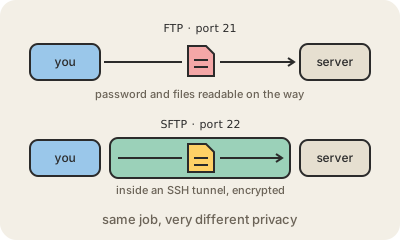
Its big flaw is that it was designed before anyone worried about eavesdroppers. FTP sends everything as plain text, including the password, so anyone on the path, such as someone on the same café Wi-Fi, can read it. It also opens separate connections for commands (port 21) and for each file, which makes it awkward to get through firewalls and NAT.
SFTP is the modern replacement, and despite the name it is not FTP with security added: it is a different protocol that runs inside SSH, over a single encrypted connection, usually on port 22. Logins can use SSH keys instead of passwords, and the files travel encrypted. There is also FTPS, which is the old FTP wrapped in TLS, the same encryption HTTPS uses; it works, but keeps FTP's multi-connection complications.
In practice: if a provider or a partner asks you to send files 'by FTP', ask for SFTP. Many businesses still exchange daily files this way, and cloud services can offer an SFTP endpoint that stores everything straight into object storage like Amazon S3. For sharing with people, a link from a cloud drive is usually simpler.
Keep in mind
- FTP sends passwords and files as plain text.
- SFTP runs inside SSH: one encrypted connection, usually on port 22.
- FTPS is FTP wrapped in TLS; similar goal, different protocol.
- If someone asks for FTP, ask for SFTP instead.
Go deeper
- File Transfer Protocol on Wikipedia
- SSH File Transfer Protocol on Wikipedia
- RFC 959, the FTP standard