DHCP
The service that gives each device an IP address automatically when it joins a network.
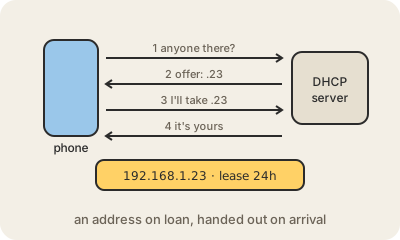
DHCP (Dynamic Host Configuration Protocol) is why you can walk into a café, pick the Wi-Fi and be online a second later without typing any numbers. When a device joins a network, it shouts 'is there a DHCP server here?'. The server, usually built into the router at home or a dedicated machine at an office, answers with an IP address that is free, and the device accepts it.
The answer contains more than the address. It also says which addresses are local (the subnet mask), which router to send everything else to (the default gateway) and which DNS servers to use for looking up names. Before DHCP, someone had to type all of that by hand into every computer, and two machines given the same address would knock each other offline.
The address is a lease, not a gift: it is lent for a while, from minutes to days, and the device quietly renews it while it stays. When it leaves, the address goes back to the pool for the next visitor. Printers and servers that need to be found at the same place every day get a reservation: the server always hands that device, recognized by its MAC address, the same IP address.
When something goes wrong, DHCP is a common suspect. If your computer shows an address starting with 169.254, it asked and nobody answered, so it gave itself a placeholder that cannot reach the internet. Restarting the router or turning Wi-Fi off and on usually triggers a fresh request.
Keep in mind
- Hands out an IP address, the gateway and the DNS servers automatically.
- Addresses are leased for a time and renewed while the device stays.
- At home, the router is almost always the DHCP server.
- An address starting with
169.254means the device got no answer.