MAC address
The built-in name of a network card, used to deliver data inside a local network.
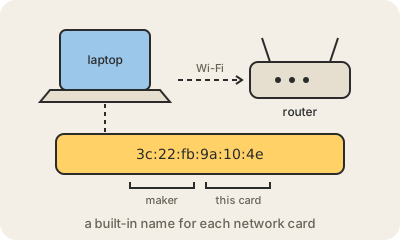
A MAC address is an identifier that comes with every network interface: the Wi-Fi chip in your phone, the Ethernet port in your laptop, the radio in a smart bulb. It is 48 bits long and usually written as six pairs of hexadecimal digits, like 3c:22:fb:9a:10:4e. The first half says which manufacturer made the hardware, from blocks handed out by the IEEE; the second half is that maker's serial for the card. It has nothing to do with Apple's Mac computers: MAC stands for Media Access Control.
Its job is local delivery. Inside one network, say your home Wi-Fi, devices find each other by MAC address: the router knows that 3c:22:fb:9a:10:4e is your laptop and sends its data there. To get from an IP address to the right MAC address, devices simply ask the network out loud, 'who has 192.168.1.20?', and the owner answers (that exchange is called ARP).
A MAC address never leaves your local network. When your data goes out to the internet, each router along the way rewraps it with its own MAC address for the next hop, while the IP address stays the same from end to end. That is why the IP address works like a postal address and the MAC address like the name of the person who opens the door.
Because it used to be fixed, a MAC address could be used to recognize the same phone in every café and shopping mall. Modern phones and laptops now use a private or random MAC address, a different one for each Wi-Fi network. It is also why 'MAC filtering' on a router is weak protection: any device can be told to announce a different address.
Keep in mind
- 48 bits, written as six pairs like
3c:22:fb:9a:10:4e. - The first half identifies the manufacturer of the network hardware.
- Only used inside a local network; routers swap it at every hop.
- Phones now use a random MAC address per Wi-Fi network for privacy.