Email protocols
The shared rules, SMTP, IMAP and POP3, that carry an email from one inbox to another.
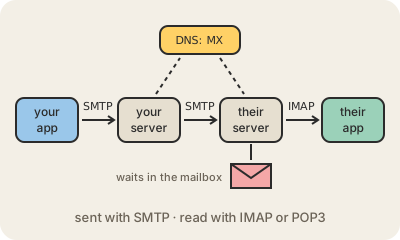
Email works between any two providers because they all follow the same open rules. Sending and receiving are separate jobs with separate protocols. SMTP (Simple Mail Transfer Protocol) moves a message forward, from your app to your provider's mail server and from there to the recipient's. IMAP and POP3 are how the recipient's app later picks it up.
The trip goes like this. You hit send, and your app hands the message over SMTP to your provider. Your provider looks at the part after the @, say b.com, and asks DNS for that domain's MX record, which names the server that accepts mail for it. It connects to that server, again with SMTP, and delivers. The message now sits in the recipient's mailbox, on their provider's server, until they open their app. Usually this takes seconds; if the other server is down, yours keeps retrying for a while before bouncing it back to you.
Reading is where IMAP and POP3 differ. IMAP leaves the mail on the server and keeps every device in sync: read it on the phone and it shows as read on the laptop, delete it anywhere and it is gone everywhere. POP3 is older and simpler: it downloads messages to one device, often removing them from the server. Today IMAP, or a provider's own app, is the normal choice.
SMTP comes from the early 1980s and originally trusted whatever 'From' address a sender claimed, which is why spam and phishing are so easy to send. Extra checks added later, called SPF, DKIM and DMARC, let a receiving server verify that a message really comes from the domain it claims. Connections between servers are usually encrypted with TLS, but that is not end-to-end encryption: each provider can read the mail it stores.
Keep in mind
- SMTP sends and relays; IMAP and POP3 are for reading.
- DNS MX records tell servers where to deliver mail for a domain.
- IMAP keeps all devices in sync; POP3 downloads to one.
- SPF, DKIM and DMARC help prove a message really comes from its domain.
Go deeper
- Simple Mail Transfer Protocol on Wikipedia
- Internet Message Access Protocol on Wikipedia
- POP, IMAP and SMTP settings for Outlook.com (Microsoft Support)