Low-code and no-code
Building apps and automations by dragging blocks instead of writing code.
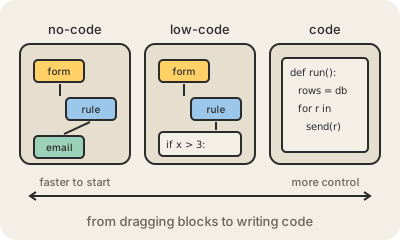
No-code tools let people build software without programming: you drag fields onto a form, connect boxes in a flow, or set rules in menus, and the tool turns that into a working app. Low-code tools work the same way but let you drop into real code when the blocks run out, so they are aimed at developers who want to go faster, and at technical people who are not full-time developers.
Familiar examples include Airtable and Notion for databases with a friendly face, Zapier and Make for automations ("when a form is submitted, add a row and send an email"), Webflow and Bubble for websites and web apps, and Microsoft Power Apps or Salesforce's builders inside large companies. A typical win: an operations team builds its own approval tracker in a week instead of waiting months in the IT queue.
The limits show up as things grow. You can only do what the platform allows; complex logic gets awkward; performance and costs can climb with usage; and moving away later is hard because your app only exists inside that vendor's tool, which is called lock-in. Companies also worry about shadow IT: important processes built by individuals that nobody else knows about, secures or maintains. Many teams use these tools for prototypes and internal tools, and switch to code when something becomes core to the business.
Keep in mind
- No-code: visual building only. Low-code: visual building plus some code.
- Great for prototypes, internal tools and automations.
- You are limited to what the platform supports, and leaving it is hard.
- Apps built outside IT still need owners, security and backups.
Go deeper
- What is low-code? (AWS)
- Low-code development platform on Wikipedia
- No-code development platform on Wikipedia