Firewall
A gatekeeper that decides which network traffic gets in or out.
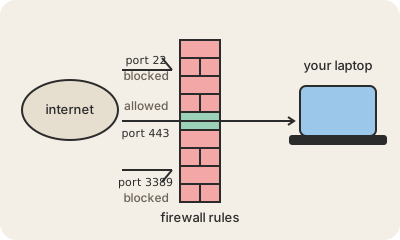
A firewall sits between a network (or a single computer) and the outside world and checks every connection against a list of rules: where it comes from, where it goes, which port it uses, which direction. Whatever matches an allow rule passes; the rest is dropped. The usual default is simple: anything that starts from inside can go out, nothing that starts from outside can come in unless a rule says so.
You already have several. The router at home blocks unsolicited connections to your laptop and TV. Windows and macOS ship with a firewall turned on, so a random machine on the café Wi-Fi cannot open a connection to your file sharing. In the cloud, a web server might allow exactly two ports, 443 for HTTPS and 22 for the admin, and nothing else. Specialized ones, like a WAF (web application firewall), read the content of web requests and block known attack patterns.
What it does not do is just as important. A firewall does not stop you from downloading Malware, does not detect phishing, and cannot see inside traffic that is encrypted. It is a border control, not a bodyguard: one layer among several.
Practical takeaway: leave the firewall on your laptop enabled, and do not open ports on your home router ('port forwarding') unless you know exactly which device and why. Every open port is a door that you are now responsible for.
Keep in mind
- A firewall allows or drops connections based on rules: address, port, direction.
- The default that matters: outbound is free, inbound is blocked unless allowed.
- Your router, your laptop and every cloud server already have one.
- It does not stop malware you download or phishing you click; it is one layer.