Speed test
A quick check of how fast your internet connection really is right now.
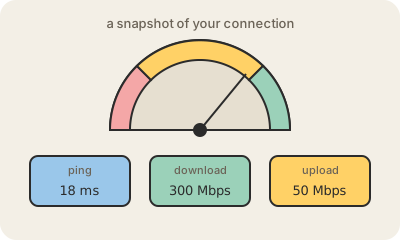
A speed test is a website or app that measures your internet connection in a few seconds. It connects to a nearby test server and reports three numbers: download speed, how fast data reaches you; upload speed, how fast you can send it; and ping, how long a small message takes to go and come back. Speeds are shown in megabits per second (Mbps), ping in milliseconds (ms).
To measure download, it pulls as much data as it can for a few seconds over several connections at once and divides by the time; upload is the same in reverse. Popular ones are Ookla's Speedtest, Netflix's Fast.com and M-Lab's open test, which also publishes its results for researchers.
The result is a snapshot of the whole path, not just of the plan you pay your ISP for. A weak Wi-Fi signal, an old router, a busy evening in the neighborhood or a test server far away can all pull the number down. To check what your plan delivers, test with a cable, close other downloads and repeat at different times of day.
Keep in mind
- It reports download, upload (both in Mbps) and ping (in ms).
- Most home plans give much more download than upload.
- Wi-Fi, other devices and server distance all affect the result.
- For a fair reading, use a cable and test several times.