Visual Studio Code
Microsoft's free code editor, the one most programmers have open all day.
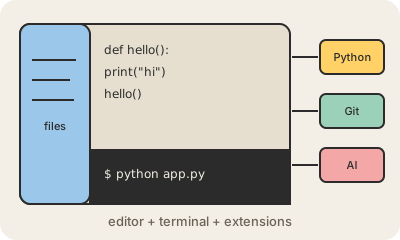
Visual Studio Code, almost always called VS Code, is a free code editor made by Microsoft and released in 2015. It runs on Windows, Mac and Linux. You open a folder, see its files on the left, edit the code in the middle, and have a built-in terminal at the bottom to run commands without leaving the window.
On its own it is fairly light. Its strength is the extension marketplace: you add support for Python, Java, Git, databases, themes or AI assistants one extension at a time, so the same editor can be a small notepad for a quick script or a full IDE for a large project. That flexibility is a big reason it has ranked as the most used editor in Stack Overflow's yearly developer survey for years.
Its core is open source, and it is built with web technologies (on a framework called Electron), which is why it looks the same on every operating system. Several newer AI-focused editors, such as Cursor, started as modified copies of VS Code, so learning it carries over to them. Despite the similar name, it is a different and much lighter product than Visual Studio, Microsoft's older, heavyweight IDE.
Keep in mind
- Free, made by Microsoft, released in 2015, runs on Windows, Mac and Linux.
- Extensions add languages, debuggers, themes and AI assistants.
- Not the same product as Visual Studio, Microsoft's older full IDE.
- Editors like Cursor are built on top of its open-source core.