Debugging
The detective work of finding why a program misbehaves, and fixing it.
Debugging is the process of tracking down a bug and fixing it. The hard part is rarely the fix itself; it is finding the cause. A wrong number on the screen might come from a typo, from bad data, from two parts of the program disagreeing about a unit, or from something that only happens on Tuesdays in one time zone.
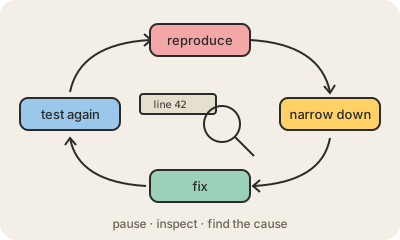
Most debugging follows the same loop. First, reproduce the problem reliably: if you cannot make it happen on purpose, you cannot tell whether you fixed it. Then narrow it down, ruling out half the possibilities at a time until the faulty line is found. Then fix it and test again, ideally adding an automated test so the same bug cannot quietly return.
Programmers have tools for this. The simplest is printing values to see what the program is actually doing. A debugger goes further: it can pause the program at a chosen line (a breakpoint), show every variable at that moment and run the code one step at a time. Logs, error reports from users and even explaining the problem out loud to a colleague, or to a rubber duck, are part of the toolkit.
Keep in mind
- Finding the cause is usually harder than writing the fix.
- Reproduce, narrow down, fix, then test that it stays fixed.
- A debugger pauses code at breakpoints and shows its values.
- Explaining the problem out loud often reveals the answer.