IDE
The app where programmers write, run and fix code, with all the tools in one window.
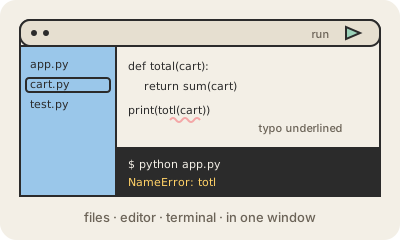
An IDE (integrated development environment) is the main workplace of a programmer: an app that combines a code editor with the tools needed around it. In one window you see the project's files, edit the source code, run the program, read its errors, use a debugger and type commands in a built-in terminal. Visual Studio Code, IntelliJ IDEA, Xcode and Android Studio are well-known examples.
What makes an IDE more than a text editor is that it understands the code. It colors the different parts so they are easy to read, suggests the name you are typing, underlines mistakes before you even run the program, and lets you jump to where something is defined or rename it everywhere at once. Many IDEs now also include AI assistants that suggest whole lines or explain code.
The line between a light code editor and a full IDE is fuzzy. Some, like Xcode for Apple platforms, come with everything for one ecosystem. Others, like Visual Studio Code, start small and grow with extensions for each language. The choice is personal; what matters is that the tools are close at hand, because programmers spend most of their day inside them.
Keep in mind
- Combines code editor, run button, debugger and terminal in one app.
- Understands code: autocomplete, error underlines, jump to definition.
- Examples: Visual Studio Code, IntelliJ IDEA, Xcode, Android Studio.
- Extended with plugins for languages, tools and AI assistants.