Video streaming
Watching a video while it arrives in small pieces, instead of downloading it all first.
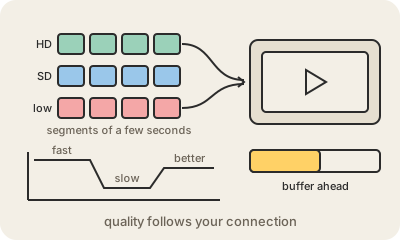
Video streaming is how Netflix, YouTube or a live match reach your screen: the video starts playing after a moment, while the rest is still on its way. Behind the scenes, the video has been compressed with a codec such as H.264 or AV1, which shrinks it by storing only what changes from one frame to the next, and then cut into short segments of a few seconds each.
Each video is also prepared in several versions, from low resolution to 4K, each with a different bitrate: how many bits per second it needs. A small text file, the manifest, lists all the versions and segments. Your player reads it and requests the segments one after another over ordinary HTTP, usually from a CDN server near you, keeping a few seconds or minutes stored ahead in a buffer.
The clever part is adaptive bitrate streaming. The player constantly measures how fast segments are arriving. If your Wi-Fi slows down, it asks for the next segments in a lower quality, so the picture gets blurrier for a while but keeps moving; when the connection improves, it climbs back up. The spinning wheel of buffering appears only when the buffer runs empty faster than it can be refilled. HLS and MPEG-DASH are the two common formats for this, and live streams work the same way, with segments created on the fly a few seconds behind real time.
Keep in mind
- The video is compressed and cut into segments of a few seconds.
- Each video exists at several bitrates; a manifest lists them.
- The player switches quality segment by segment to match your connection.
- Buffering happens when the buffer empties faster than it refills.
Go deeper
- Adaptive bitrate streaming on Wikipedia
- Streaming audio and video (MDN)
- Streaming media on Wikipedia