Incognito mode
A browser window that forgets your visit on this device. It does not make you invisible.
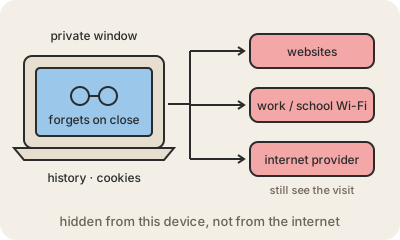
Incognito mode (Chrome's name; Safari, Firefox and others call it private browsing) opens a browser window that keeps nothing once you close it: no history, no cookies, no saved form entries, no logins. The next person who uses the same computer will not see which sites you visited, and sites will not recognize you from an earlier session in that window.
That is all it does, and it is useful: checking your email on a friend's laptop, buying a present on the shared family computer, or seeing how a website looks to someone who is not logged in. Every window opens clean and closes clean.
What it does not do is hide you from anyone outside your device. The websites you visit still see your IP address and what you do there; if you log in, they know exactly who you are. Your employer or school can still see traffic on their network, and your internet provider can still see which sites you connect to. Files you download and bookmarks you save stay on the computer. Malware on the device is not stopped either.
If you want to hide your traffic from the local network or your provider, that is a different tool, such as a VPN, which moves the trust to the VPN company instead. For privacy from trackers, browser settings that block third-party cookies help more than a private window does.
Keep in mind
- It forgets history, cookies and logins when the window closes.
- It protects you from other people who use the same device.
- Websites, network owners and your internet provider still see your visits.
- Downloads and bookmarks stay; it is not a VPN or an antivirus.