BIOS and UEFI
The first program a PC runs: it checks the hardware and starts the operating system.
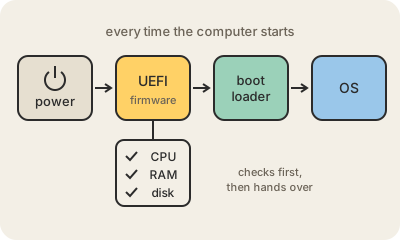
When you press the power button, the processor knows nothing about your disk, your keyboard or Windows. It starts by running a small program stored in a chip on the motherboard. On older PCs that program was the BIOS (Basic Input/Output System); on almost every computer made since the early 2010s it is UEFI (Unified Extensible Firmware Interface), although many people still call it "the BIOS" out of habit.
Its job is short and essential. It checks that the CPU, the RAM and the other parts respond, sets them up, finds a disk with an operating system and hands control to the boot loader, the small program that starts the system proper. It also keeps settings like the boot order, the clock and whether virtualization is turned on. You reach its setup screen by pressing a key such as F2 or Del right after power-on.
UEFI replaced the BIOS because the old design had hard limits: it could not boot from disks larger than roughly 2 TB and offered little protection. UEFI handles big disks, starts faster, has a setup screen you can use with a mouse, and adds Secure Boot, which only lets boot loaders signed with trusted keys start. That makes it much harder for malware to hide underneath the operating system. Because it is firmware, manufacturers occasionally release updates for it, usually to fix bugs or security holes.
Keep in mind
- It runs from a chip on the motherboard every time the computer turns on.
- UEFI is the modern replacement for the BIOS; many people still call both "BIOS".
- Secure Boot only lets signed, trusted boot loaders start.
- Updates fix bugs and security holes, but a failed one can leave the machine unable to start.