AWS Direct Connect
A private, dedicated network link from your own building straight into AWS.
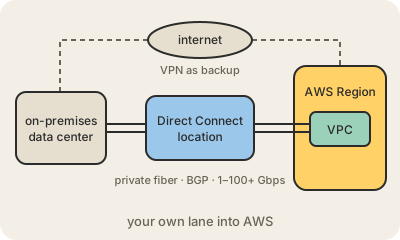
AWS Direct Connect gives you a physical network connection between your data center or office and AWS that does not travel over the public internet. You get a port at a Direct Connect location, a colocation facility where AWS has its routers, and a fiber cross-connect links your equipment (or your telecom provider's) to it. Dedicated connections come in fixed port speeds, from 1 Gbps to 100 Gbps and above; smaller hosted connections, from 50 Mbps, are sold through AWS partners.
Over that cable you create virtual interfaces and exchange routes with BGP. A private virtual interface reaches your VPCs, a public one reaches AWS public services like S3 without going through the internet, and a transit one connects to a Transit Gateway that fans out to many VPCs. A Direct Connect gateway lets one connection reach VPCs in several AWS Regions.
Companies use it for steady, heavy traffic between on-premises and the cloud: database replication, backups, hybrid apps, big migrations. Latency and throughput are more predictable than over the internet, and data sent out of AWS over Direct Connect is billed at a lower rate. Three caveats. The traffic is private but not encrypted by default: you add MACsec on supported ports or run a VPN on top. Setting it up takes weeks, because it involves physical cabling. And one link is a single point of failure, so AWS recommends redundant connections in separate locations, or at least a Site-to-Site VPN as backup.
Keep in mind
- A physical, dedicated link that bypasses the public internet.
- Virtual interfaces and BGP decide what you reach: VPCs, public services or a Transit Gateway.
- Not encrypted by default; use MACsec or a VPN over it when needed.
- Plan for redundancy: two connections, two locations, or a VPN backup.