Wi-Fi security
How a Wi-Fi password keeps neighbors out and scrambles what travels through the air.
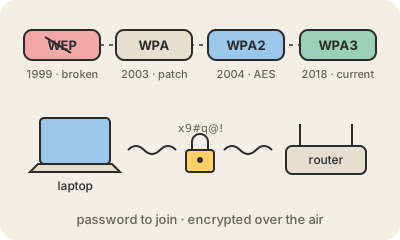
Wi-Fi is radio, so anyone nearby can pick up the signal. Wi-Fi security is the set of standards that decides two things: who is allowed to join the network, and how the data flying between your device and the router is encrypted so that listeners only hear noise. The Wi-Fi password is the visible part of it.
The standards came in generations. WEP (1999) was the first, and its encryption was broken within a few years; today it offers almost no protection. WPA was a quick patch in 2003, and WPA2 (2004) brought strong AES encryption and became the norm for over a decade. WPA3 (2018) improves the weak spot of WPA2 at home: with WPA2, someone who records you connecting can try millions of password guesses on their own computer later, while WPA3 makes each guess require a live attempt against the router. WPA3 also protects past traffic even if the password leaks later.
For a home network, the practical rules are short. Use WPA3, or WPA2 with AES if some device cannot handle WPA3; never WEP or an open network. Pick a long passphrase rather than a short clever word. Change the router's admin password (it is not the same as the Wi-Fi one), keep its firmware updated and turn off WPS, the push-button pairing feature with a history of flaws. A separate guest network keeps visitors and cheap smart gadgets away from your laptops.
Keep in mind
- Wi-Fi security controls who joins the network and encrypts the radio link.
- WEP is broken; WPA2 with AES is acceptable; WPA3 is the current standard.
- A long passphrase matters more than a clever short password.
- It only protects the hop to the router; on public networks, HTTPS or a VPN does the rest.
Go deeper
- Wi-Fi Protected Access on Wikipedia
- Wi-Fi security (Wi-Fi Alliance)
- Wired Equivalent Privacy on Wikipedia