Amazon WorkSpaces
A full Windows or Linux desktop that lives in AWS and that you open from any device.
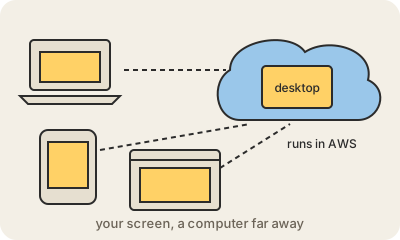
Amazon WorkSpaces gives each employee a computer that runs in an AWS data center instead of on their desk. They open an app or a web browser on whatever device they have, a cheap laptop, a Mac, a tablet, and see a complete Windows or Linux desktop with their programs and files. The keyboard, mouse and screen are local; the actual computing happens far away. This idea is called a virtual desktop.
For a company it means no shipping and repairing laptops for every new hire: IT creates a desktop in minutes and deletes it when the person leaves. Data stays in the cloud, so a lost laptop does not mean lost files. It is popular for remote teams, contractors, call centers and seasonal staff. WorkSpaces Personal gives each user their own persistent desktop; WorkSpaces Pools hands out fresh, shared desktops that reset after each session.
The trade-off is that you need a decent internet connection, and things like video editing or gaming feel worse over the network than on a local machine. You pay monthly or by the hour per desktop.
Keep in mind
- A Windows or Linux desktop that runs in AWS, opened from any device.
- IT can create or remove a desktop in minutes.
- Files stay in the cloud, not on the laptop that might get lost.
- Needs a good internet connection; billed monthly or hourly.
Go deeper
- What is Amazon WorkSpaces? (official docs)
- Amazon WorkSpaces product page
- Desktop virtualization on Wikipedia