Traceroute
A tool that shows every stop your data makes on the way to a destination.
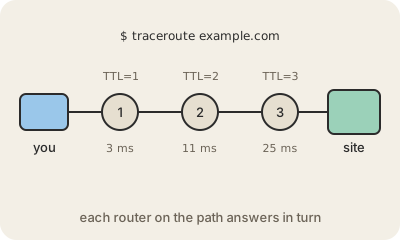
Data sent across the internet does not travel in a straight line: it hops from router to router until it arrives. Traceroute is a command that shows those hops. Run traceroute example.com on a Mac or Linux, or tracert example.com on Windows, and you get a numbered list of every router along the path and how long each one took to answer.
It works with a clever trick. Every packet carries a counter called TTL (time to live), and each router subtracts one from it; when it reaches zero, the router drops the packet and sends back an error saying so. Traceroute sends a first packet with TTL 1, so the first router replies; then TTL 2, so the second one replies; and so on until it reaches the destination. Each reply reveals one hop.
Network engineers use it to find where things go wrong. If the times jump suddenly at one hop, or the list stops at some point, the problem is probably around there. Read it with care, though: rows of asterisks, * * *, often just mean that router is set not to answer, not that it is broken, and the path back to you can differ from the path there.
Keep in mind
- Traceroute lists every router between you and a destination.
- It is
tracerouteon Mac and Linux,tracerton Windows. - It sends packets with a growing TTL and collects the error replies.
- Asterisks usually mean a router stays silent, not that it is down.