Shell script
A text file full of terminal commands that the computer runs one after another.
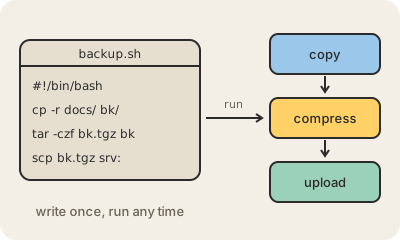
A shell script is a plain text file containing commands you could type at the command line, saved so the computer can run them all in order with a single instruction. If every morning you copy a folder, compress it and upload it to a server, you can write those three commands in a file like backup.sh and run just that file instead.
The first line usually says which shell should read it, for example #!/bin/bash for Bash, the default shell on most Linux systems (Macs have used Zsh by default since 2019, and it understands most of the same syntax). After marking the file as executable with chmod +x backup.sh, you run it with ./backup.sh. Scripts can also use variables, if conditions and loops, so they can decide what to do and repeat steps over many files.
Shell scripts are the glue of software work. They install programs, start servers, run tests in CI pipelines, rotate logs and schedule nightly jobs. They are quick to write but easy to get subtly wrong: a missing quote around a file name with spaces can make a script act on the wrong files. For anything long or complicated, teams usually switch to a language like Python.
Keep in mind
- A text file of shell commands, run in order with one instruction.
- Starts with a line like
#!/bin/bashnaming the shell that runs it. - Common for installs, backups, deploys and scheduled jobs.
- Great for short automation; long logic is better in a full language.