Caching
Keeping a copy of an answer close by so you do not have to work it out again.
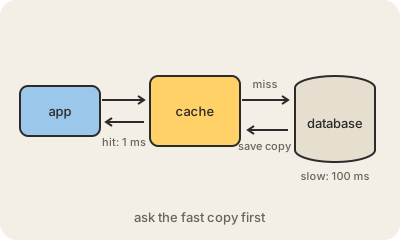
Caching means saving the result of something slow or expensive, a database query, a web page, a photo, a calculation, in a place that is fast to read, so the next time someone asks for it you hand over the saved copy. That fast place is the cache. When the answer is there, it is a cache hit; when it is not, it is a cache miss, and you do the slow work and usually store the result for next time.
Caches are everywhere in a single click. Your browser keeps images and files from sites you visit. A CDN keeps copies of pages in cities near you. The application keeps popular database results in memory, often in a tool like Redis. The database keeps hot data in RAM instead of on disk. Even the processor has its own CPU cache. Each layer saves a trip to something slower.
The hard part is knowing when a saved copy is out of date. If a price changes but the cache still holds the old one, users see the wrong price. Common answers are giving each item an expiry time (a TTL, time to live) or deleting it from the cache whenever the original changes, which is called cache invalidation. Getting it wrong is a classic source of confusing bugs, which is why programmers joke it is one of the two hard problems in computer science.
Keep in mind
- A cache stores copies of slow-to-get results in a fast place.
- A hit is served from the cache; a miss does the slow work and saves the result.
- Browsers, CDNs, apps, databases and processors all cache.
- The hard part is invalidation: not serving stale data.