Deployment
Getting a new version of software from the team's computers to real users.
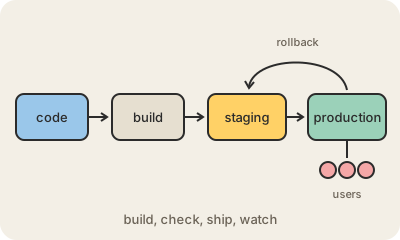
Deployment, or deploy in everyday tech talk, is the moment new code goes live. A developer finishes a change on their laptop; deploying it means building it, copying it to the servers (or the app store, or the cloud) and switching users over to the new version. Until then, the change exists only for the team.
A typical deploy has a few steps. The code is packaged into something that can run, like a container image. It often goes first to staging, a copy of the real system where the team can check it. Then it goes to production, the real thing, and someone watches error rates and dashboards to make sure nothing broke. If something did, they roll back to the previous version.
Years ago, deploys were rare, manual and scary: a long night with a checklist. Today many teams deploy several times a day, automatically, through a CI/CD pipeline, and use techniques like blue-green deployment or canary releases to move traffic over gradually. Small, frequent deploys are easier to check and easier to undo than big ones.
Keep in mind
- Deploying means putting a new version of software in front of real users.
- Staging is the rehearsal; production is the real thing.
- Automated pipelines let teams deploy many times a day.
- Every deploy needs a way back: a rollback to the previous version.