OCR
Software that reads the text in an image so a computer can search and edit it.
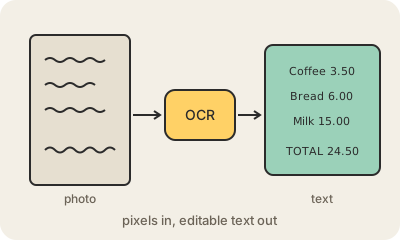
To a computer, a photo of a receipt is just colored dots. OCR (optical character recognition) turns those dots into real text: letters and numbers you can search, copy, paste into a spreadsheet or have read aloud. It is what lets you copy text from a photo on your phone, search inside a scanned PDF, or deposit a check by taking a picture of it.
Classic OCR worked in steps: clean up the image, find the lines of text, split them into characters and match each one against known shapes. Modern systems use neural networks that read whole words or lines at once, which copes much better with odd fonts, crooked photos and handwriting. Open-source engines like Tesseract run on any computer, and multimodal AI models can now read a document and also understand it: pull the total out of an invoice, or turn a table in a photo into a spreadsheet.
It is still not perfect. Blurry photos, faded copies, unusual layouts and messy handwriting cause errors, like a 0 read as an O or a 1 as an l, so anything important (amounts, ID numbers, medical data) deserves a human check. OCR also matters for accessibility: a screen reader can only read a scanned document aloud once OCR has turned it into text.
Keep in mind
- It turns pictures of text into real, searchable, editable text.
- Modern OCR uses neural networks and handles handwriting better.
- Multimodal models can read a document and extract the data you need.
- Check important numbers: look-alike characters still get confused.