Mesh Wi-Fi
Several Wi-Fi units spread around a home that work together as one network.
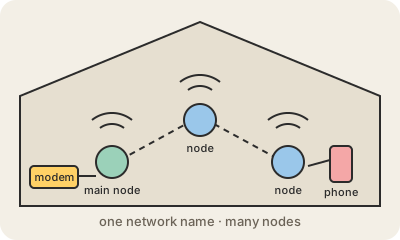
A mesh Wi-Fi system covers a home with several small units, called nodes, instead of a single router. One node connects to your modem; the others go around the house, and they talk to each other to pass traffic along. To your phone and laptop it all looks like one Wi-Fi network with one name and one password, and devices switch to the nearest node as you walk from room to room.
It solves a common problem. A single router sits in one spot, and its signal weakens with distance and with every wall, floor and appliance in the way, so far rooms get slow Wi-Fi or none. Older range extenders helped by repeating the signal, but they often created a second network and cut the speed roughly in half. A mesh system coordinates its nodes: it picks the best path for each device and, in better models, uses a separate radio channel or a cable between nodes so their link back to the router does not compete with your devices.
Mesh is not magic. Each hop between nodes adds some delay and can lose speed, so placement matters: nodes should be close enough to hear each other well, ideally halfway between the router and the dead zone, not inside it. Connecting the nodes with an Ethernet cable, when you can, gives the best results. In a small apartment one good router is usually enough; mesh pays off in larger homes, on several floors or behind thick walls.
Keep in mind
- Several nodes work together as one Wi-Fi network with a single name.
- Devices move to the nearest node as you walk around.
- Better than old extenders, which often split the network and roughly halved speed.
- Placement matters; wiring the nodes together gives the best speed.