Feature flag
A switch in the code that turns a feature on or off without shipping a new version.
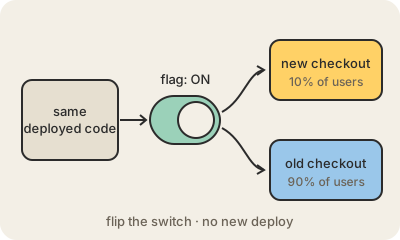
A feature flag is an if-statement whose answer lives outside the code. The program asks "is new_checkout on for this user?" and a setting, usually stored in a config service or a database, says yes or no. Flip the setting and the app changes behavior right away, with no new build and no new deploy.
This separates two things that used to be the same moment: putting code on the servers and letting people use it. A team can merge an unfinished feature hidden behind a flag, turn it on first for employees, then for 1% of users, then 10%, watching errors and sales at each step. If something goes wrong, someone turns the flag off and the old behavior is back in seconds, without rolling back the whole release.
Flags also power A/B tests (half of users see version A, half see B), premium features that only paying customers get, and "kill switches" that shut off an expensive or broken part of a system during an incident. Services like LaunchDarkly, Unleash or Flagsmith manage them at scale.
The catch is that every flag doubles the number of paths through the code. Old flags that nobody removes pile up as technical debt, and a forgotten flag flipped by mistake can switch on code that has not run in years. Good teams give each flag an owner and an expiry date.
Keep in mind
- Separates deploying code from releasing a feature to users.
- Enables gradual rollouts, A/B tests and instant kill switches.
- Turning a flag off is much faster than rolling back a release.
- Stale flags are technical debt: remove them once a feature is settled.