Cloud console
The website where you log in to see and manage everything you rent in the cloud.
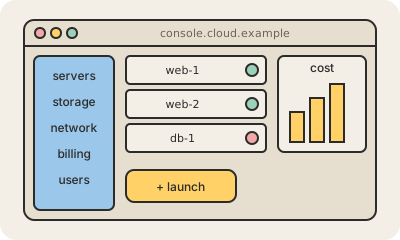
A cloud console is the web page a cloud provider gives you to manage your account. On AWS it is the AWS Management Console, on Microsoft Azure the Azure portal, and on Google the Google Cloud console. You log in with your browser and can create servers, upload files, look at graphs, check the bill and change permissions by clicking instead of typing commands.
It is the friendliest way in, and the best one for learning and looking around: seeing what is running, finding out why something failed, checking how much this month will cost. Most consoles also include a built-in terminal, like AWS CloudShell or Google Cloud Shell, for running quick commands without installing anything on your computer.
For building real systems, teams usually prefer code: the command line, the API, or infrastructure as code tools like Terraform. Clicking around is hard to repeat exactly, hard to review and easy to get wrong, a habit people jokingly call "ClickOps". So the console often becomes the window for watching and investigating, while changes go through code. Because it can do almost anything, access to it should be protected with two-factor authentication.
Keep in mind
- The web page for managing a cloud account by clicking.
- AWS Management Console, Azure portal and Google Cloud console.
- Great for exploring and investigating; code is better for repeatable changes.
- Protect it with two-factor authentication: it can do almost anything.