Markdown
A way to format text with plain symbols like # and *, readable even before it is rendered.
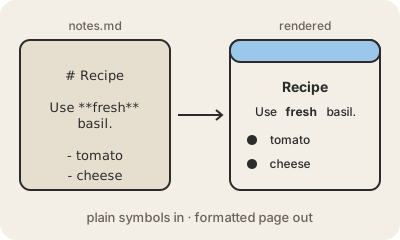
Markdown is a simple set of conventions for writing formatted text with an ordinary keyboard. A line that starts with # becomes a heading, a word between ** becomes bold, lines starting with - become a bulleted list, and [text](https://example.com) becomes a link. A program then turns those symbols into a nicely formatted page, usually HTML.
John Gruber and Aaron Swartz created it in 2004 with one goal: the raw text should look fine on its own, like a well-written email, so you never need a preview to understand it. That is why it spread everywhere: README files on GitHub (README.md), notes apps like Obsidian, chat apps like Slack and Discord, documentation sites, and the answers chatbots like Claude or ChatGPT write, which come out in Markdown and get rendered on screen.
Because the original description left some cases ambiguous, there are several dialects. CommonMark is a precise specification that most tools now follow, and GitHub Flavored Markdown adds tables, checklists and strikethrough on top. Since it is plain text, a Markdown file opens in any editor, works well with git, and will still be readable decades from now.
Keep in mind
- Formatting with plain symbols: # for headings, ** for bold, - for lists.
- The raw text is meant to be readable without rendering it.
- Files usually end in
.md; GitHub showsREADME.mdon every project page. - CommonMark is the precise spec; GitHub Flavored Markdown adds tables and checklists.