Load testing
Simulating lots of users at once to see how a system holds up before real ones arrive.
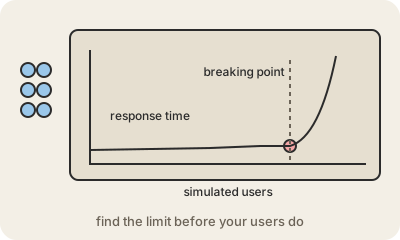
Load testing means sending a large, controlled amount of fake traffic to an app or API to measure how it behaves under pressure. A tool plays the part of thousands of users, logging in, searching, paying, and records response times, error rates and how much CPU, memory and database capacity the system uses as the numbers climb.
There are a few flavors. A plain load test checks the traffic you expect, like a normal Monday peak. A stress test keeps pushing until something breaks, to find the limit and see how it fails. A spike test jumps from quiet to huge in seconds, like a ticket sale opening, and a soak test runs a steady load for hours to catch slow leaks. Popular tools include k6, JMeter, Gatling and Locust.
It matters because performance problems rarely show up with one tester clicking around. A query that takes 20 ms alone can take seconds when a thousand people run it at once. Running load tests before a launch or a big sales day tells you whether autoscaling kicks in fast enough, where the bottleneck is, and how many servers you really need. Run them against a test environment, or tell your cloud provider and your team first: to a server, a load test looks a lot like an attack.
Keep in mind
- Simulated traffic to measure speed, errors and resource use under load.
- Variants: load, stress (find the limit), spike, soak (long duration).
- Common tools: k6, JMeter, Gatling, Locust.
- Do it before launches or peak days, and warn people first.
Go deeper
- Load testing on Wikipedia
- Load testing guide (Grafana k6 docs)
- Software performance testing on Wikipedia