BYOD
Using your own phone or laptop for work, under rules set by your employer.
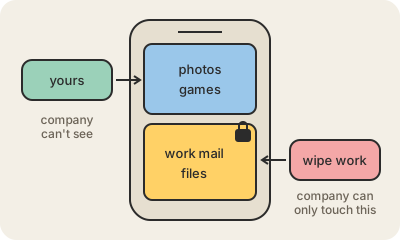
BYOD stands for "bring your own device": instead of handing out company phones and laptops, the employer lets people read work email, join meetings and open documents on the devices they already own. It saves money, and people like carrying one phone instead of two. It also means company data now lives on a device that is used for games, family photos and downloads the IT team never approved.
So BYOD comes with a policy. Typical rules: the device must have a screen lock and up-to-date software, work apps must be installed through the company's mobile device management (MDM) tool, and if the phone is lost the company can erase the work data. Modern phones make this less invasive with a separate work profile on Android or a managed work account on iPhone: work apps and files live in their own compartment, and a remote wipe removes only that part, not your photos.
Before you accept, it is worth reading what the company can see. A well-designed setup lets IT see that the work profile is healthy, not your personal messages or browsing. Some workplaces skip BYOD for sensitive roles, such as hospitals or banks, and give out managed devices instead, or only allow work access through a browser that keeps files off the phone.
Keep in mind
- BYOD means work data on a personal device.
- It usually requires a screen lock, updates and an MDM app.
- Work profiles keep work apps and files in their own compartment.
- A good policy lets the company wipe work data, not your photos.
Go deeper
- Bring your own device on Wikipedia
- Bring your own device guidance (UK National Cyber Security Centre)
- What is BYOD? (IBM)