Account recovery
The way back into an account when you forget the password or lose your phone.
Account recovery is the process a service offers when you cannot sign in the normal way: you forgot the password, your phone with the two-factor app was stolen, or you no longer have access to the email you signed up with. Instead of locking you out forever, the service checks your identity some other way and lets you set new credentials.
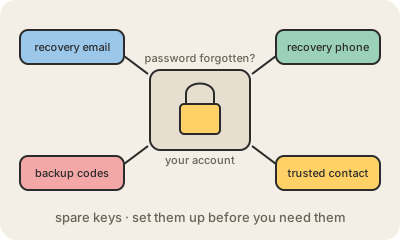
The usual spare keys are a recovery email address and a recovery phone number that receive a code, a set of one-time backup codes you print or save when you turn on two-factor authentication, and in some services a recovery contact, a trusted friend who can vouch for you, or a long recovery key. When none of that works, big providers like Google and Apple fall back to a slower process that can take days, on purpose, so that a thief cannot rush through it.
Recovery is also a door for attackers. If the recovery email is an old account with a weak password, or the recovery phone can be hijacked with SIM swapping, an attacker can use it to take over your main account without ever knowing your password. That is why it matters to set it up before you need it, keep the recovery details current, and protect them as well as the account itself.
Keep in mind
- Set up recovery options before you lose access, not after.
- Common options: recovery email, phone, backup codes, trusted contact.
- Keep backup codes somewhere safe and offline.
- Weak recovery details are a shortcut for attackers.
Go deeper
- How to recover your Google Account (Google Help)
- What to expect during account recovery (Apple Support)