Browser extension
A small add-on that gives your web browser a new ability.
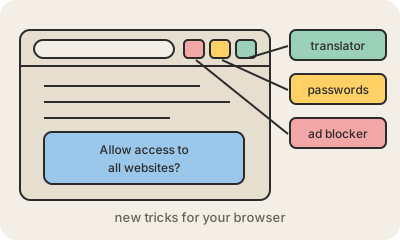
A browser extension is a small program you install into your web browser to add a feature it does not have on its own. Ad blockers, password managers that fill in your logins, translators, grammar checkers, coupon finders and tools that save a page for later are all extensions. They usually show up as a small icon next to the address bar.
Extensions are built with the same languages as websites (HTML, CSS and JavaScript) plus a manifest file that declares what the extension is and what it is allowed to do. Chrome, Edge, Firefox and Safari share a common extension system, so the same extension can often be published for all of them with few changes. You install them from official stores like the Chrome Web Store or Firefox Add-ons.
The power that makes them useful is also the risk. An extension that can "read and change all your data on all websites" can see every page you open, including your bank and email. Extensions are sometimes sold to new owners who push a malicious update to their existing users. A good habit: install only what you really use, from developers you trust, check the permissions it asks for, and remove the ones you no longer need.
Keep in mind
- Adds features to the browser: ad blocking, passwords, translation and more.
- Built with web technologies and installed from official stores.
- Chrome, Edge, Firefox and Safari share a similar extension system.
- Broad permissions mean it can see everything you browse: install with care.
Go deeper
- Browser extensions (MDN)
- Install and manage extensions (Chrome Web Store Help)
- Browser extension on Wikipedia