AWS Backup
One place to schedule, keep and restore backups of your AWS data.
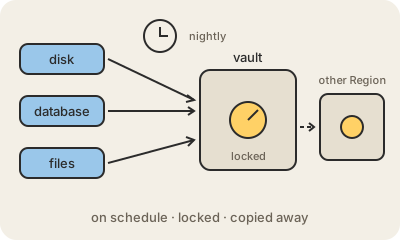
Each AWS storage service has its own way of taking snapshots: Amazon EBS disks, Amazon RDS databases, Amazon DynamoDB tables, file systems, S3 buckets. AWS Backup puts them all under one roof, so instead of remembering a dozen different settings, you write one set of rules and see every backup in a single console.
The rules live in a backup plan: how often to copy (every night, every hour), how long to keep each copy (35 days, 7 years), and where to store it. You then say which resources the plan covers, often simply "everything tagged backup=daily", so new databases get protected the moment someone tags them. Copies go into a backup vault, and can also be copied automatically to another Region or another account, in case a whole Region has trouble or an account is compromised.
That last point matters because of ransomware. An attacker who gains admin access may try to delete the backups before encrypting everything else. Vault Lock makes a vault write-once: until the retention period ends, nobody, not even the account's administrators, can delete or shorten those copies. A backup is only real once you have restored it, so AWS Backup also lets you run restore tests on a schedule.
Keep in mind
- Centralizes backups of EBS, RDS, DynamoDB, file systems, S3 and more.
- A backup plan sets frequency, retention and which resources, often by tag.
- Copies can go to another Region or account for disaster recovery.
- Vault Lock makes backups undeletable until they expire, a defense against ransomware.